Friday, June 14, 2013
WWDC 2013: The Biggest News that No One's Reporting
Wednesday, June 5, 2013
xProtect II, The Sequel: Now More xProtect-ier
Unless you stop them. And, if you're a SysAdmin, locking down their mechanism is something you should consider.
With OSX 10.8.4, some of the the ground rules have changed:
1) The previous scripts that we've used to fix the issue (based partially on work by the formidable Greg Neagle and others) no longer work. Apple engineers —lovely people that they are — changed the xProtect meta plist "key" from "JavaWebComponentVersionMinimum" to "MinimumPlugInBundleVersion". Thanks, Apple.
2) A new executable, plist and launchD item have been included into the xProtect mechanism: xprotectupdater-init. This means now that you have two, not one, executables and their cruft to manage, lock or delete in order to stop Apple from wreaking havoc on your network.
What are the files and processes and where are they located?
The previously known files are located at:
/usr/libexec/XProtectUpdater
/System/Library/LaunchDaemons/com.apple.xprotectupdater.plist
The new files are located, similarly at:
/usr/libexec/XProtectUpdaterInit
/System/Library/LaunchDaemons/com.apple.xprotectupdaterinit.plist
The new launchD item is:
sh-3.2# launchctl list | grep xprotect
- 0 com.apple.xprotectupdater-init
A previously known file that's now changed formatting is located at:
/System/Library/CoreServices/CoreTypes.bundle/Contents/Resources/XProtect.meta.plist
Good times.
What to do about it?
In my book, on an enterprise network, the SysAdmin and not Apple should be in control of software versioning. Which means it's my responsibility to fix this stuff. It's also important to note that even though we've been running a previous xProtect fix, the mechanism GOT REINSTALLED with the OSX 10.8.4 combo updater.
Which means, moving forward, you should either expect to re-run this script each and every time you update your Mac OS or, perhaps, create some kind of LaunchD item which is always running and looks for these processes and kills them.
Our method: doesn't delete the files, we unload them and then either move them or rename them so we can have access to them later if we so desire. Here's the script I put together yesterday that does the job on a one-time basis for us. We're big on logging here (as you'll see) but you can use whatever stdout you prefer.
Tuesday, September 11, 2012
802.11g Whiz
For most of us, our relationship with technology starts with our relationship to media. And thanks (mostly) to Apple, we now consume a vast amount of media: 2 million movies, 200 million TV show episodes, 16 billion songs, 25 billion apps, & 100 million books. Why such high figures? Because our appetite for collecting and owning more/better/newer things has never abated. Go back no further than your own childhood for proof: kids in their youth that collected LP's, cassette tapes and CD's, matured into post-grads collecting DVD's and BluRay's and, nowadays, find themselves as adults curating digital rips of those discs. And, probably, of their friends' discs. And, perhaps, from those friends' disks and, increasingly, from total strangers. Never mind if it's illegal, though, because we're Americans, God-damnit, and we want to have or own EVERYTHING.
Maybe I'm a typical consumer and maybe not, but I'll start with myself: at last calculation, I have 100GB of photos, 100GB of music, 268GB of movies, and about 180GB of TV shows. And, to consume that stuff, I have two iPods (the original and a nano), two iPhones (because I just can't part with the original), an iPad, a Macbook Air, a Mac Mini which is hooked up to my TV and, most-recently, a Mac Pro tower. Which means, by any reasonable definition that I'm utterly insane, right?!?
Well, not exactly (although my fiancee might disagree...). Turns out, we're all buying increasing numbers of computers, cellphones and gadgets each year. That's because the "problem" of having abundant data, has created a far more interesting question: shouldn't we be able to access the data we desire in a way that's convenient, seamless, and effortless?
Hells, yes, friends. Hells, yes.
And, in a post-PC world, it's not a problem to claim that wanting to access media at different times and in different places requires... different devices. The real problem is that we don't have easily identifiable categories of devices. People are simple: give us something tangible that we can grasp (figuratively and, in this case, literally) and we'll buy a gazillion of your widgets.
And let's start by being honest about how we'll define our categories: since so many devices do the same kind of tasks — check email, browse the web, create various kinds of art work, etc. — I suggest instead that we define our categories based on where we put our devices, not what we do with them. Or, put another way, "how big is the screen"? Therefore, I humbly submit the following to start the conversation:
- living room devices
- desktop devices
- laptop devices
- handbag devices
- pocket devices
- wearable devices
Category #6: Wearable Devices
Wearable devices, simply put, are devices you don't have to hold with your hands that bring you closer to your data. It's also one of the emerging market of the future. And I'm not just saying that because Google is trying to pretend it's the latest fashion statement. It isn't, Sergey. Please. I'm saying that because wearable technology — the result of miniaturization — is allowing us to interact with our technology on a truly casual basis. If you wear a bluetooth headset or use your iPod nano as a watch, you understand what I'm saying. But here's where it gets fascinating, friends... As Ray Kurzweil and INTEL and others predict: the result of technology's miniaturization along with our never-ending thirst for more and more data will be the inevitable merging of human and machine. Which is to say: wearable tech will evolve into implanted tech. In fact, it already has. But hearing-aids, pacemakers and artificial hearts which are commonplace implants today are nothing compared to what's about to start happening. Right now, computer chips are being implanted in the eye, enabling the blind to see. Right now, there are machines we can control by thinking. Sweet fucking jesus, it's an amazing time to be alive, people.
Category #5: Pocket Devices
The pocket device is the smallest device that you hold in your hands to access your data. This is the category everyone is talking about this week, thanks to Apple and whatever new iPhone they'll be announcing. Which is curious to me because I don't think that Apple really "re-invented" the phone as Steve Jobs famously announced in 2007. What they DID re-invent, however, was the pocket device. For the first time, ever, that device in your pocket is truly a computer. Which is why, largely because of Apple (but not exclusively you Droid douches), that device you carry in your pocket now contains three or four episodes of "Breaking Bad", an advanced navigation and map system, every photo you've ever snapped of your two children, twenty to thirty of your favorite games, and a download of every Oprah Book Club recommendation. Oh, and it's also a phone. Go back in time just SIX years and someone would have laughed at you if you'd told them that you'd have all of this on your pocket device. Yeh, right. And soon, that same device will replace cash. Yes, I'm serious.
Category #4: Handbag Devices
I define this category as those devices that are too big for a shirt pocket or for one hand. These are the devices that help make accessing data fun, interactive and readily available in many locations: on the bus and train; on the sofa, in the kitchen or in the bedroom; while at the office with co-workers or at a park with the kids... This category was defined and popularized by Apple with its iPad and was further cemented for consumers with the popularity of the Kindle, the Nexus 7 and the Samsung Galaxy Tab. This category is confusing for consumers because of the overwhelming number of options. But make no mistake: it is ALL one category. In my humble opinion (and others), Apple dominates this market and will only further pwn it when they offer an iPad-mini. And, since all of various-sized devices from all of these various companies do, essentially, the same tasks, the only real question the consumer needs to ask is: on how big a screen do I prefer to view my data when I'm not at my desk?
Category #3: Laptop Devices
These are devices that fit on your lap, and offer the most portable methods to do the most powerful computing. Not much to add to a category of devices that is already widely accepted and in use all over the world. Even if Apple or Samsung makes the slimmest model out there by removing the media tray and SATA hard drive, it's still a laptop computer.
Category #2: Desktop Devices
The most traditional and easily identifiable of all device categories, probably because it's been around the longest. ENIAC, considered the first computer when it was announced in 1946, filled an entire floor with its component parts. Even so, operators still sat a desk to run it. Today, super computers still fill large rooms, and the average computer who creates audio, video, film, graphics, and documents... usually sits at a desk. Although "standing desks" are growing in popularity these days as well.....
Category #1: Living Room Devices
This category of devices is still emerging but very, very exciting. I define it as those devices which fit most comfortably in the living room, because that's usually the room with the biggest god-damn screen you an muster. In this category, you'll find the XBOX, the Playstation, the Wii, the Roku & AppleTV and, increasingly, a full-fledged computer that acts as a media server. I have a Mac Mini hooked up to a 36" Hi-Def TV because the idea of an AppleTV or Roku box just seems... stupid to me. I'd rather have an entire computer connected to my biggest screen so that I can do whatever I'd normally do on my desktop or laptop computers. But the market is wide open here and, not surprisingly, many are looking to Apple to help define this category. But no one, and I mean no one, is more excited than Gene "My Last Name is a Cheese" Munster for Apple to finally announce a TV set, with with it's rumored "revolutionary" user interface. Full disclosure: I think Gene Munster looks like a former football player.
So there you have it, kids. Six easily definable categories for the world of devices. But, as you've been such a lovely crowd, I'd like to offer a couple of bonus parting shots:
First, as the very electronic structure of our homes becomes "futurized", look to see a new category of devices in the not-too-distant future: home devices. Entire walls and counter tops will be used as video monitors and the home network will start to resemble, even more closely, the most complex enterprise networks of today. Expect the same for cars.
And, lastly, I really feel that one of the untapped aspects of the future is how all of these categories of devices will flow together. Currently, each of your devices in each of these categories operates independently of one another. There are a few bridge-like applications, but this is only the beginning. Soon, all devices will be inter-dependent: as you walk into your home on your phone, the call will transfer, seamlessly, onto your home network; documents that you're viewing on your pocket or handbag devices will be able to be "wiped" off one screen and onto another allowing you to use the new interface to continue viewing or working on your document.
Like I said before: it's a sweet time to be alive if you're in to tech. Let's hope this week brings us something truly wonderful.
On the road in Newark,
The Mac Dweeb
Monday, June 11, 2012
Big Annoucements From Apple at This Morning's WWDC
- New Macbook Airs were announced with more RAM, faster processors and larger SSD drives. This is great news for folks who like to travel very light but still want a lot of power on the go.
- The existing line of new Macbook Pros were also upgraded to include better processors, graphics, thunderbolt connectivity and hi-def facetime cameras.
- But the really big news was the announcement of all NEW Macbook Pros: now - like the Macbook Airs - thinner, faster, withe support bor both usb 2 & 3, thunderbolt, and a gorgeous new retina display.
- The new generation Macbook Pros and Macbook Airs will also come with a new feature called: "power nap" which will allow them to continue downloading email, app store updates, software updates and time capsule back-ups while the mac is "asleep".
- Integration with Facebook throughout the OS
- Incredible new 3D maps, and turn-by-turn directions when you're using the Maps to travel
- New functionality for Siri so you can post to Facebook, check sports scores and OPEN APPS FOR YOU. Siri will also now work on iPads.
- Passbook - a feature that will store all of your coupons and tickets and is location based.
- And even an initiative to work with various car companies to get Siri to work better in your car.
- iMessages - an application that will allow you to send/receive messages from any Mac to any iOS device
- Dictation - Now you can talk to your Mac (like Siri) and it will dictate what you say into text.
- Safari - now includes "tab view" and a unified bar for both your searches and URL's (like Chrome)
- Facebook - now integrated throughout the OS
What Wasn't Said; What Was Clearly Demonstrated
It is, in fact, the one thing that no one has announced (and I'm still watching Scott "I'm Dweebier Than You Are" Forstall), but it's this: Apple without Steve Jobs is going to be JUST FINE.
They still know how to deliver hardware, software and integrated solutions. They still know how to compete against their biggest rivals. They still know how to raise the bar on what's possible. They still know how to build excitement and deliver a knock out punch with cool features that people want and want to love.
And, if nothing else, today's keynote was a strong a statement as you can imagine hearing from the mothership in Cupertino: Apple is still working to be at the top of the game and succeeding. And, the company that Steve Jobs built has, without question, inherited his DNA and his formula for surviving, thriving and mesmerizing.
Life after Steve.... I do believe it's going to continue to be a lovely ride.
Tuesday, October 11, 2011
Firmware fail!
![]() |
| An interesting thing happened on the way to EFI... |
Fortunately, the dang thing froze, so I was able to grab a picture.
If you've seen anything like this before, lemme know.
Monday, October 10, 2011
Thought Different
MG Siegler at TechCrunch posted a lovely piece on Steve Jobs today. I enjoyed what he wrote, but he missed the real story about the passing of Steve Jobs. I'm not surprised by this: nearly all bloggers and commentators have missed the real reason why so many people from so many walks of life are so publicly mourning the loss of Steve Jobs.
I'll get to that in a moment, but first: here are the two sound reasons that Siegler did mention for the outpouring of reactions from the world:
Reason #1: People are mourning Jobs' death because of the emotional ties that they have to Apple products.
Absolutely true. People have incredibly powerful emotional connections to their iPhones, iPods, iPads and Macs. And I'm not just saying that as a fanboy (although I certainly am one of those), but rather as someone whose observed that magic as it unfolds: small children going berserk over getting the chance to play with an iPad; seniors who use an iMac for the first time and Skype with children, grandkids, and relatives in different countries; college students and others who regularly show their iPhone photo collection to friends at parties, on the subway and more.
Reason #2: People are mourning Jobs' death because he died at such a young age, robbing us of another twenty years of his possible genius and innovations.
This is the selfish reason. We feel a loss for what might have been. Or, as The Onion website so eloquently put it: we just lost the last American who knew what the fuck he was doing. Our culture usually mourns when someone dies before their prime, but especially when someone radically exceptional and celebrated dies in their prime: James Dean, Jimi Hendrix, Princess Diana, and now, Steve Jobs. Although we can certainly look forward to another five years worth of other devices and services that Steve and the top brass at Apple have been developing, how many other contraptions might the man have created? How many other technologies might he have disrupted and made better in incalculable ways? We'll never know.
But the third reason - the real reason - why people are so upset by Jobs' dying is far more simple, far more primal: the world just lost a great communicator and philosopher.
Steve Jobs was able to communicate complexities with a simplicity that all of us could understand. We desperately seek this from our elected officials, but we never expect it from the CEO of a corporation. And yet Steve Jobs wasn't really a CEO although that's the title he held. He wasn't really a titan of industry, although he wound up radically transforming more than a few major industries. The man was - most of all - a communicator who specialized in the philosophy of the human condition and the magic of his technology to help us to share that condition. His canvas was technology, but his message was living an inter-connected life with the things we cherish most: conversations, music, photos and videos.
In other words: memories & stories. Steve Jobs told stories.
One need not look any further than any of his keynotes for proof of this, but especially those keynotes when some new iteration of iLife was demonstrated. Do you really think its accidental that every sample video being edited in iMovie and all of the photo-streams being showcased in iPhoto tell a story? It isn't. Those keynotes featured products invented for the purpose of telling the story of a multi-racial, inter-connected life of joy and adventure.
Even more profound is this: Jobs unleashed us to become story-tellers ourselves, using his software and hardware. More than anyone else, even more than Facebook: Steve Jobs made it possible through the technology he and Apple created to share our lives with one another in more gorgeous ways, in more simple ways and in more fun ways. The master story-teller became the teacher, showing us how we could each share our unique story with one another...using his tools and making Apple one of the most wealthy corporations on the planet.
Simply brilliant.
The loss of this teacher is painful. But, in the end, just as he imbued his DNA into Apple so that his vision would continue on after he left, so too did we receive a similar gift from Steve: we got the reminder that each of our lives, fleeting as they are, represent an ever-unfolding story that can be told in myriad ways.
We lost the teacher, but not the story. And, for that, I am especially grateful today.
Wednesday, December 1, 2010
AFTER Lion comes...
Monday, June 8, 2009
My 30 Second Interview With Jonathon Ive
On the way out of the Moscone Center this morning - as streams of people are leaving to get some fresh air and digest all of the announcements from the WWDC 2009 keynote address - I see a familiar face walking towards me. It's Jonathon Ive. I can't friggin' believe it. This guy is design royalty.
But I'm from Los Angeles: we're not afraid to approach the rich of famous in my city. Heck, I produce theatre with lots of famous actors & comedians, so I often have to work with known personalities. This was a rare opportunity and certainly not a time for sudden shyness, so I approached the master designer and introduced myself.
The following is an EXACT transcript of what transpired:
Me: Jonathon...?
Jonathon: [turns, sees I'm no one he knows] Yes...?
Me: David Koff. Nice to meet you.
Jonathon: Thank you.
Me: May I snap a photo with you?
[beat. he pauses, looks around, unsure of what to say, clearly uncomfortable.]
Me: It's not a big deal. If you'd rather not, it's quite OK.
Jonathon: Well, there are others here who are also deserving of a photo but I can't accommodate them as well, so... how about we just shake hands?
Me: That would be lovely. I'm a great fan of your work.
Jonathon: Thank you, that's very kind.
Me: You're welcome. Keep up the good work.
Jonathon: [looking at me like I'm insane] I'll do that. Thank you.
[He walks off. I wait a moment. I follow calling after him, running and waving my arms wildly as if in a Seth Rogan romantic comedy...]
Me: Godspeed, Jonathon! I love you! Have my babies...!
OK, well maybe that's not how I ended the conversation, but everything before that was accurate. Ive is a notoriously private and quiet individual which is why I was surprised to even see him out and about with the crowd. And which is why I was surprised he even stopped to turn and speak with me.
But that's your dutiful Mac Dweeb, folks. Always willing to find the hard-to-get interviews... even when the interviewee doesn't know they were scheduled to meet me in the first place.
WWDC Updates - part 2
+ rentals and purchasing of movies/tv shows/iTunesU on phone
+ tethering: use your iPhone to connect to the web - wired or wireless
+ AT&T to support tethering...eventually
+ streaming video over http
+ auto-fill (to remember usernames/passwords)
+ support for hebrew, arabic, thai, greek, chinese... over 30 languages supported
+ Find My iPhone feature - use MobileMe to locate your phone with google maps and to send your phone a message and play an audible noise. or.... to remotely WIPE the phone in case of senstive data.
WWDC Updates
More from WWDC
WWDC 2009
Well, folks: it is nearly 8am and your humble Mac Dweeb has arrived at WWDC, or the World Wide Dweeb Conference for Apple fans. Thousands here already. It's nutty. More dweebs than you can shake a stick at. In fact, I forgot my stick. Left it at the hotel. Damn.
Monday, June 1, 2009
Sssssh: It's a Secret - Buy a Cheap Mac
What is absolutely true is that Apple doesn't make flimsy, cheap computers. They never have. For that reason, you won't find a brand new $299 Mac no matter how hard you look. Apple's cheapest Mac is the Mac Mini which starts at $599. And sure, you can buy a Dell Mini for $299, but it won't have the same computing power, features, or accessories as the cheapest Mac portable.
Wednesday, May 27, 2009
The Problem with Safari 4 Beta: It Just Kinda Sucks
I like a good cup of coffee in the morning, mellow get-togethers with close friends and web browsers that do the one thing they were meant to do - browse the web. Problem is: Safari 4 beta doesn't come close to living up to its advertised awesomeness. Even worse, it kinda sucks ass.
Now look: I'm not a guy in a lab coat and stop watch. I don't have "metrics" or "benchmarks" or "a degree in measuring shit". I'm just a guy who manages a network of 250 Macs and works on at least four different Macs at any given time. So frankly, I think my own experiences are pretty valid. And in EVERY case, on every computer, Safari 4 starts off really fast but then - after a week or so - it breaks down, wears out and slows down to a crawwwwwwwwwwwwwwwwwl.
And you know what? It seems I'm not alone in discovering this. Not by a long shot.
What can I tell you? I'm a fan of Apple but they produce the occasional turd every now and again. Repeatedly, actually. But hey: every company does. Except for Pixar... but they're a freak of nature. Seriously.
Despite my disappointments with Safari 4 Beta, I acknowledge a simple truth: there's no single browser that's so full of awesomeness that I'll stop using all other browsers. Frankly, I hope that will always be the case. If everyone used the same browser, innovation would stop, competition would falter and we'd all be much worse off than we are right now. Worse, we'd all be using some shitty version of Internet Explorer. Ugh. Kinda makes me shiver.
In the meantime, I'm running Firefox 3.0.11 and enjoying the speed. It's really nice and I'm enjoying the add-ons, especially for delicious, multiple GMail signatures and the ridiculous. I wonder if there's an add-on to thrown darts at Karl Rove...?
Hmm....
So Apple missed the mark with this beta version of Safari. That's OK, it's a beta for crying out loud (just like GMail)
Friday, May 22, 2009
The Mac Tablet: What We Know, What I Predict
- I will twoot tomorrow
- I am tweeting now
- I twatted yesterday
First, the screen size: 5" x 8.66"
Tuesday, May 19, 2009
Save $$$ - Upgrade Your Own Mac Video Tutorials
- memory
- hard drives
- optical drives
- accelerators
- PCI cards
- eSATA cables
The Easiest Way to Fix Your Mac
Back in the days of OS 9, if your Mac was ever acting strangely, there was a trick you do that was so simple, that anyone – even the motards – could do it and help to maintain their own Macs. Back then, all you needed to do was to rebuild your desktop files and EVERYONE knew how to do that: you just restarted your computer while holding down the option and apple keys. Doing this caused a couple of files that were invisible to be rebuilt which, more often than not, fixed the problem. The upshot? Even if it didn’t fix the problem, rebuilding the desktop files was something that couldn’t cause damage to your Mac. It would ONLY help.
And man: wouldn’t you love to know that there was something like that now for OSX? Well there is and – shock of all shocks – it’s totally FREE. The application is called Applejack and it’s so simple that even a chimp could use it. Maybe not a whale, but come on: whales don’t type well at all, so it’s not a fair thing to expect.
Let’s break it down in five easy steps:
Step One: Head over to sourceforge and download the app to your Mac. Benefits? It’s free and everyone likes free.
Step Two: Install the software. If you want to also check your RAM, choose to do a customized install and also install “MemTest”. Benefits? You’ll get two programs for the price of one.
Step Three: Restart your Mac, hold down the “Command” and the “S” keys to boot into “Single User Mode”. (NOTE: You must use a wired, usb keyboard for this. Wireless keyboards will NOT work) Single User Mode is a fancy term that tells your Mac to “turn off the graphics and boot strictly into text only mode”. Benefits? Seeing your Mac boot into single user mode is seriously cool. In fact, since you’ve probably never SEEN your Mac boot up into plain ‘ole text before, you’ll feel like you’re a computer whiz seeing something rare and forbidden.
Step Four: Type the following “applejack auto restart” and then hit enter. Now go grab a cup of coffee. Benefits? Harvard thinks coffee is healthy.
Step Five: Watch your screen for about five minutes as Applejack runs through five different tasks – running disk utility to repair your internal hard drive, fixing your permissions, cleaning up a series of cache files, validating core preferences and removing all swap files. When it’s finished, your computer will restart auto-magically. Benefits? You’ve just enjoyed an awesome cup of coffee while looking VERY cool to your co-workers.
While this might not fix deeper problems on your Mac, it’s simple, easy and free. Give it a shot and relive your old “rebuild the desktop files” glory days, why don’t’cha?
Monday, May 18, 2009
Damn the Press – Look for Jobs @ WWDC 2009
With Apple’s Worldwide Developer Conference ramping up in a few short weeks and with the company having recently abandonned the annual MacWorld conference, most of the tech press has been salivating over “the big question”: is Steve Jobs going to return from his medical leave to give the big keynote presentation…?!? The timing seemed appropriate and with new iPhones, a new OS and a rumored new Mac Tablet device all being prepped by the firm. And who better to announce these new products than the man who helped bring Apple back from the dead?
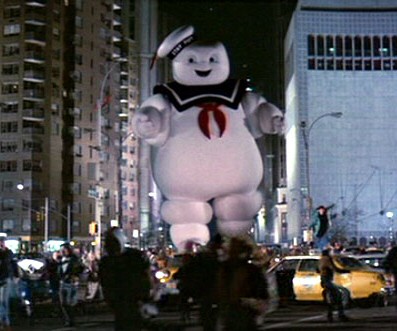
Reality, however, has a funny way of destroying hopes, rumors…and hearts. Apple announced last week that Phil Schiller – Apple’s own version of the StayPuff Marshmallow Man – would be delivering the keynote and not Steve Jobs. If you were listening carefully last week, you might have actually heard thousands of hearts all over the world simultaneously breaking.
But…
Apple didn’t say that Steve Jobs wouldn’t participate in the keynote address. What they said was “A team of Apple executives, led by Philip Schiller, Apple’s senior vice president of Worldwide Product Marketing, will deliver the keynote.” This, for me, leaves open the possibility of His Royal Steveness making a guest appearance at the keynote address.
A guest appearance makes sense for a variety of reasons. First, Jobs and Schiller are very fond of using iChat in their keynote presentations, often to great humorous effect. Second, a guest appearance via iChat frees Steve to participate in the keynote from anywhere in the world: his sick bed, his living room or an undisclosed location at CENTCOM. Third, by not directing or assembling an entire keynote presentation, Jobs gives his lieutenants and the company time to shine while he focuses on killer product announcements and doing shtick with Phil.
My bet? If a new iPhone model is introduced with a front facing camera, look for Jobs to introduce the iChat app during the first-ever iPhone video call with Schiller. And who knows….? If Jobs’s health is remotely better, perhaps he might even make that call during a guest appearance at the Moscone Center. We’ll find out in just a few short weeks.
Oh, and, “One More Thing”: as long as Apple doesn’t let Bertrand Serlet drone on during the keynote, no one will fall asleep.